Author: admin

  • WordPress Online Resources

    WordPress Online Resources

    There are far too many resources for WordPress available online to mention in one single post.  However, the resources listed here are some excellent sources for those new to the community.  This information will help get you started.


    WordPress.com vs. WordPress.org

    This is one of the very first questions that many people ask when they jump into the world of WordPress.  In short, WordPress.com is a hosted solution that is simple to set up and requires very little technical knowledge.  WordPress.com websites are hosted on a large server elsewhere that is maintained and updated by a company called Automattic.  WordPress.org is home to the open source software, WordPress.  A person who uses this version must have their own web host and is responsible for downloading and installing the software on the web server as well as keeping continual maintenance of the website.

    WPMU has created a great article that describes the difference between WordPress.org and WordPress.com.


    WordPress Websites for Beginners

    WPBeginner.com — This blog contains very useful information as well has a robust set of archives on all things WordPress.  The site is specifically designed for the beginning WordPress user.

    15 Most Frequently Asked Questions by WordPress Beginners — This blog post by WPBeginner is a great starting place to answer those questions that everyone has at the beginning of their journey.

    codex.wordpress.org — At first glance, a beginner might be hesitant to dig into the WordPress Codex for answers, however, I have found the documentation and information in the Codex to be very well done and easily understood. The codex can get fairly advanced for those in depth topics, however, even simple questions can be found using this resource.


    Additional Website Resources

    WPCandy.com — This site includes news, opinions, blog posts, and podcasts on all things WordPress.  If you want to know what is happening in the world of WordPress, Ryan Imel and his team at WP Candy will keep you in the loop.

    WPModder.com — For great tutorials, check out Adam Warner’s site at WP Modder.  This site offers great learning resources as well as suggestions and information for premium themes and plugins.


     Videos

    Youtube is packed with good WordPress tutorials.  It is worth noting the date of the tutorials that you search for and view on youtube.  Because WordPress software is regularly updated, new versions have different functionality.  Make sure that the video you choose is compatible with the version of WordPress that you are currently using if your task is impacted by the Version (WordPress 3.0 vs. WordPress 3.3)

    WordPress.tv is a great resource for videos and continued WordPress learning.

    WordCamp.tv is a specific section on WordPress.tv that contains all of the videos from WordCamps across the world.

    WordCamp Phoenix – Okay, so I am partial to WordCamp Phoenix, I admit it.  As a member of the organizing team for the 2o12 Phoenix WordCamp, I think we had some amazing sessions and speakers for the event.  Check them out.

     

  • WordPress Books

    WordPress Books

    There are several books available for beginners who are just beginning their adventure into the land of WordPress.  Two of the best books specifically for WordPress are:

    Digging Into WordPress by Chris Coyier & Jeff Starr

    Digging into WordPress is a practical guide full of information that you can put to use immediately in your work with WordPress.  Not only is this book a great find, but the website, http://digwp.com/, is an ongoing blog with helpful hints in the world of WordPress.


    WordPress for Dummies by Lisa Sabin-Wilson

    Lisa covers vital information on both WordPress.com and WordPress.org in her book, “WordPress for Dummies”.  She does a great job starting with the beginning, but including more intermediate topics such as beginning concepts in PHP and CSS so that more advanced users can get their hands dirty.  She also has a companion website that accompanies her book and includes bonus chapters.

  • Themes and Plugins

    Themes and Plugins

    The power of WordPress is in the community and the ability to extend WordPress through the use of themes and plugins.  (*note that plugins can only be used in WordPress.org sites, not WordPress.com)  In no means is this meant to be a complete listing of all themes and plugins, but it will give you a starting point from some of the largest premium WordPress services.


    Themes

    DIYThemes — Home to the Thesis framework, DIYThemes provides theme options starting at $87.

    Elegant Themes — A premium theme shop that sells individual yearly memberships for $39 per year. Developers can purchase a developers membership for slightly more.

    WooThemes — Woo Themes is one of the largest theme shops.  They sell theme packages starting at $70.  In addition, they have plugins that are designed to work specifically with their themes.  Their most recent addition to the WordPress space includes WooCommerce, ecommerce plugins for WordPress.

    StudioPress — StudioPress is the author of Genesis (one of the most commonly used frameworks for WordPress).  Pricing for Genesis Framework and one child theme start at $79.95.


    Plugins

    WordPress.org — One of the best places for plugins comes from the WordPress repository.  You can access the repository by going straight to http://wordpress.org/extend/plugins/ or you can also access it from within the WordPress dashboard.

    “Gravity Forms” by rocketgenius — There are many great premium plugins out there, but Gravity Forms is one of my favorites.  This paid plugin allows you to customize and extend online forms on a site.  Check them out.  They are very user friendly and can be customized. They are widely regarded as one of the best plugins in the WordPress community.

    Backup Buddy — This premium plugin is a must have for backing up your WordPress website.  Pricing starts at $75.   This is money well spent for peace of mind.

    *Please note for the purpose of transparency, some of these links are affiliate links, however, I am only an affiliate for services that I stand behind 100% and use for my own site.

  • Facebook Timeline For Businesses

    Facebook Timeline For Businesses

    The only thing certain in our world is that change will happen.  Once again, Facebook is changing the business pages to include the timeline similar to the current personal profiles.  These changes were announced yesterday, are available now and will become the default page view on March 30th.  If you manage a business page, don’t delay, March 30th will be here before you know it.


    Changes to Facebook Business Pages

    Default Landing Tab — There is no longer a default landing tab.  Every visitor (fan or not) lands on your timeline.  Some are questioning whether this will make “fan gating” (hiding certain information from non-fans) irrelevant.  Facebook insists that hiding coupon codes will still be useful strategy with fan-gating as a way to increase “likes”.

    Timeline Cover Photo — The most obvious aesthetic change is the timeline cover photo.  Facebook has made it clear that there are certain restrictions regarding the content on this cover.  The cover is not allowed to show any specials or call’s to action.  The text on the cover photo should be minimal.  They even state that you cannot have your website address, email address and no arrows pointing to like buttons.  They want the cover photo to be visual and clean (without spammy content).  For those who need to know, the image size is 851 X 315.

    Where did the tabs go? — The tabs are now called “apps” and are found under the timeline cover photo.  The facebook photo app defaults as the first app.  The remaining 3 apps can be custom apps (formerly tabs)


    Feature Apps — Since the “tabs” have moved under the cover photo, there is limited real estate for the tabs.  If you click the down arrow to the right of the apps, you will see all of the apps installed on the page.  But many users will not know to do this, nor will they take the time.  It is therefore important to showcase the top 3 apps immediately under the cover photo.  (Note, the image size for the “app photos” is 111 X 74.)

    More Real Estate

    The new timeline and the “apps” (formerly called tabs) give more real estate for your information.  The new format at 810 provides more room to design custom apps (tabs)  that truly resemble a mini website.  The old style tab at 520 still displays, but it is not centered.  Old tabs should be resized to fit the new 810 format. (click the images below to enlarge)


    Reveal/Hide (Fangating) — Reveal/hide is still possible with the custom apps, but may take a back seat given that there is no longer a default landing tab for each page.  A useful strategy would be to create a custom app and if it is not featured in the top three, you can post it on your time line and pin it to the top of the timeline.  That custom app could have a fan reveal section that only fans can see after they like your page.

    In summary, it is early and these changes have only been out for 2 days.  Information will continue to trickle out regarding these important new changes to Facebook Business Pages.   There are reports that the Facebook engineers are working on a bug with the like button on the new timeline.  For those wanting to make the switch, but nervous about the bugs, I would advise waiting a week or two to implement these new changes.  Remember to act pro-actively.  These changes will be automatically made on March 30th so don’t delay.  Make sure your business has their best face forward on their business timeline.

  • WordPress Hosting Services

    WordPress Hosting Services

    WordPress.org Sites Require Hosting

    For people building sites on WordPress that are not hosted on the WordPress.com platform WordPress Hosting Services will be needed for you site.  There are many different options for hosts and it is important to find the right WordPress hosting service for your particular situation.


    Managed WordPress Website Hosting

    Tech Tools recommends WP Engine for WordPress HostingMy favorite Managed WordPress hosting service is through WP Engine.   WP Engine provides managed hosting which means that they take care of your daily back-ups and they do a great job of keeping your site up, fast and scalable as needed.  What I like most about WP Engine is the staging environment that you receive free with your WP Engine account.  This allows you to pull your full site into a staging area, update the new plugins, software, or brand new version of WP without affecting the live site.  Once updates are made and verified on the staging site, they can then be made to the live production site with confidence in knowing that there will be no conflict with plugins, themes or the core WordPress software.

    WP Engine also has daily back-ups as a part of the service.  These daily back-ups are automatically scheduled and executed.  Users can also create “manual restore points” in addition to daily back-ups.  The back-up system has a very simple to use restore feature that allows you to restore a site to a previous version with one single click.

    WP Engine site customers also receive as a part of their service, access to Sucuri website security services.  Sucuri is the premier website security company for WordPress websites.  They both monitor sites proactively to detect security risks and they also clean hack sites and restore them.  Having Sucuri coverage on your website, gives a greater piece of mind.  Lastly, because WP Engine exclusively hosts WordPress websites, their technical support staff is second to none.  They know WordPress and provide a level of support not found at other standard hosting companies.


    For WordPress Hosting Services, my pick is:

    Other WordPress Hosting Companies:

    Standard Hosting Companies

    There are many other WordPress hosting services that can host WordPress websites.  The standard companies do not offer the level of service as described above and they are not my first recommendation for hosting.  However, they are hosting companies with a good reputation and are very affordable.   It is important for those who choose this option to realize that you must spend the time and energy to go into your site and update all WordPress, themes and plugins as well as set up your own back-up system.  It is highly recommended that people who choose this option be familiar with FTP programs and the directory structure of a web server.  These are just a few of the many options available.

    Bluehost.com

    Dreamhost.com

    Hostgator.com

    *Please note for the purpose of transparency, some of these links are affiliate links, however, I am only an affiliate for services that I stand behind 100% and use for my own site.

  • Taming the Email Beast

    Taming the Email Beast


    Editors Note — Many of the tips and tricks that I will share throughout the series will be specific to users of gmail.  I am an avid gmail fan and use the professional google apps version for my business.  When possible, I will give options for other email platforms.  


    Taming the Email Beast

    You have 100 new messages“.  Sound familiar?  Remember when email was new and you got excited to see a new message.  AOL had that voice notification, “You’ve got mail” that was was made famous by the Meg Ryan/Tom Hanks movie of the same name.  In 1998, it was exciting to get mail and to hear those 3 little words.  I daresay that times have changed.  A more likely scenario might be, “You’ve got 101 new messages” and that is taking just a one hour lunch break.  So how do you tame the email beast?  This post is the beginning of a series of posts on how to harness that email and wrestle control once again.  Enjoy!

    Create a Delayed Delivery Email

    If you are like me, you use your email inbox as a “to do” list.  For me, it is the first thing I check in the morning and the last thing that I check before bedtime.  If someone asks me for something, I will often ask them to email me exactly what they want.  My email is my organization tool for my business.

    The downside of having email be such a key part of your organization strategy is that it can “take over” and become a beast.  Have you ever gotten an email and thought, “I really need this email, but I wish it would go away and just come back next week when I am working on that project”.  Well guess what, that can happen.  Through a service called “lettermelater.com” you can schedule an email to be delivered at any point in the future that you specify.  Once you sign up for a free account, you can log into schedule these emails.  However, the easiest way that I have found to do this is directly from my email program.  Below is a sample email that I composed that will be delivered later via this handy service.  If this were an email already in my inbox, I could have simply forwarded that email just as shown below.


    Once sent, you will get a confirmation email that will tell you if the email was sent.  See below.


    This trick helps me keep my inbox manageable and each email becomes a “to do” list item as it arrives.


    Outlook Option

    If you are an outlook user, one of the little known tools in outlook is a feature that will allow you click a new calendar item or a to item in you outlook through drag and drop.  Simply drag the specific email to the calendar or Task area and it will open a new task or calendar item with the details included.


    Happy Emailing!

  • Finding Peace Amidst A Chaotic Life

    Finding Peace Amidst A Chaotic Life

    What do you do when you get stressed out? Everyone operates just a bit differently and it is so important to know what makes us tick and what keeps the clock from exploding. I’ve been quite busy lately with some pretty big projects and my stress is definitely up a notch.

    Meet Romeo. Romeo is our 11 month old miniature poodle who came to us through a local rescue. I am very fortunate to be able to work at home and have access to my “furry stress management device” all day long. There are times when I pick him up and hold him in my lap as I work. At other times, I open the office door (which opens to my backyard) and I throw the tennis ball out into the yard and we have a great game of fetch.

    We all need to find ways to regulate our state of mind. Whether it be a picture of family, a squeeze ball, a Starbucks, or a pet, we all need to know what can calm us.

    And for all of you business owners and managers out there… consider having a “bring your pet to work day”. It might be interesting to see what it does for staff morale.

  • Video Email…Bringing Back the Personal Touch

    Video Email…Bringing Back the Personal Touch

    How many times have you written something or read something that was intended one way, but interpreted another way.  Don’t get me wrong… email is awesome.  It has become my own personal “to do list”.  I even send myself email reminders scheduled for future dates and times telling me not to forget something (more on that in a future post).

    Email can be an amazing organization tool and can increase efficiency.  But in the midst of it all, I can’t help but wonder if we have lost the person behind the message.  This thought process led me to a little known service called eyejot that allows me to send video email messages to friends, clients, and colleagues.


    Here is how it works: 

    I log into my account at eyejot and record a video with my webcam.


    After clicking “compose message”, I get the following screen allowing me to record my message straight from eyejot.


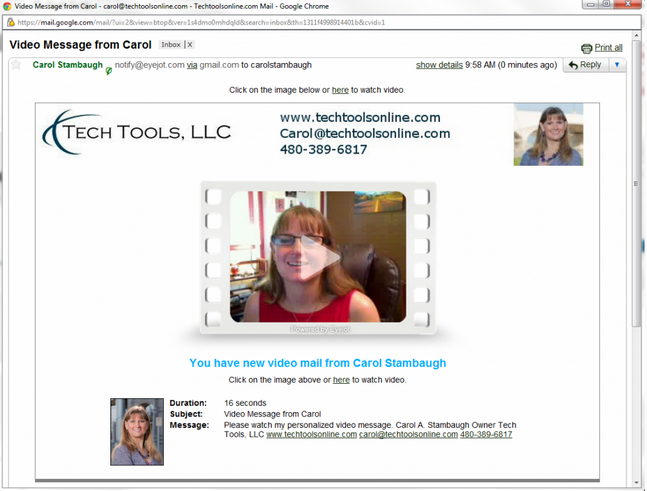
    After pressing send, the recipient receives the following email that I have branded specifically for me.


    When they click the play button, it opens the following webpage.  This webpage is also customized and branded to meet my needs.

    Videos can also be embedded into web pages.  Below is the video as recorded for this demonstration.

    One last thing you can do with eyejot is to record a welcome message and embed it into your contact page so that people can send you video messages as well.  Below is a screenshot of my video contact page on my website.

    In closing:

    There are a couple of things to consider when selecting a video email messaging system for you.  There are several products out there that come in at all levels of pricing.  Eyejot has a free version, but that does not allow for the customized branding.  The version of eyejot that I use is a paid version and was at the right price point to meet my needs. It is one of the more modestly priced services and because of that, it is co-branded with no ability to remove the eyejot logo.  There are other services that allow exclusive branding, but you will pay more for those services.

    It takes a little bit of time to customize the email and the website landing page to include your logos and your branding.  However, once you have it done… it’s done.  Another thing I have found is that using eyejot seems more stable in firefox than chrome.  I am a chrome girl (for the time being), but when I try and use eyejot in chrome, I have problems with the flash.  Firefox is steady so I simply compose all video messages in firefox.

    Happy video messaging everyone!!!!


  • Project Management Made Easy

    Project Management Made Easy

    There are a bazillion different project management tools on the market these days.  You can spend a bundle of time and money getting up to speed on many of the most complex tools.   What I love about Manymoon is that it is affordable, simple and easy to get started.  I had the opportunity to help train an association who is new to Manymoon last week.  I created some tutorial videos specific for their needs and got into the video spirit.  So here is a very quick video blog about why I love Manymoon and cannot imagine working without it.  One additional thing worth mentioning is that in addition to the affordability, the support is amazing.  Great job to all those over at Manymoon!  (Ahhhhh, now I can check off that overdue task that says, “Blog about Manymoon”)

    Until next time,

    Carol

  • Unplugged

    Unplugged

    It is no accident that I started Tech Tools.  I jokingly refer to myself as “The Accidental Geek”, but it really isn’t an accident.  You see, I LOVE techno toys.  And it’s not just techno toys like “Best Buy” tech toys.  I love tech solutions.  Therefore, it is most natural that I landed right here where I am supposed to be.  So for the person who loves her technology way too much, I cannot remember going without my cell phone for more than one night for the past 5 or 6  years… until this past weekend.

    One of the things that we love to do as a family is to escape the heat and craziness of Phoenix and head up to the beautiful mountains of AZ.  It is always nice to get away from the “brown cloud” and enjoy the immense beauty of the stars lined with pine trees.  We’ve been doing this for a couple of years, and it is very rare that we don’t have some semblance of cell phone service allowing me to check in periodically.  This weekend, I forgot my power cord.  So I turned off the phone, put it in the glove box and left it there for 2 full days.  HORRORS of all horrors, I know.  Guess what, I survived.  And you know what else, everyone else who might have tried to get a hold of me over the weekend also survived.  And surprisingly, I didn’t even miss it.  Perhaps this is an experiment worth repeating.  So, if you try and email or “facebook” me one weekend and I don’t reply, take heart.  I just decided to unplug for the weekend.  I’ll plug back in first thing Monday morning.  What started as an accident turned into a blessing.  I encourage each one of you to try it sometime.

    Plugged back in and having a blast,
    Carol

    PS.  Photo courtesy of Chris Frailey Photography.  This photo was taken during my “unplugged” weekend.  This is near Woods Canyon Lake, elevation 7,500 foot located on top of the Mogollon Rim in eastern AZ.